Thursday, 8 November 2018

October 9, 2018—KB4464330 (OS Build 17763.55) Windows 10 failed to install on HP Elite 8100 - Blue Iris running as a service


This issue has been bugging me for other a month now, I figured it was related to the Windows 10 update that was deleting peoples files etc whilst it did what it did... turns out it wasn't. I had a similar issue with another HP in my house which turned out to be an old USB stick that interfered with the update..

So with that in mind I set about pretty much pulling apart my HP 8100 Elite.. still didn't work.. then I remembered that a Compaq I have didn't like a Windows 10 update a while ago and that turned out to be the fault of an out of date RAID driver (!?!) that Windows 10 hadn't updated.. so then went about installing all manner of old crappy drivers that I probably didn't need..

Then I sat down and thought.. humm.. it always got to 95% before crapping out and saying it couldn't finish the job (which was after the reboot). Then I remembered.. I had a copy of BlueIris running as a service at boot-up, which was handled by Task Scheduler.. I disabled that and hey presto the update worked.

It didn't occur to me that it would be an issue as its gone through several updates whilst BlueIris has been in place without issue so whatever is in this release is precious enough to take issue with either this program, or anything running as a service (that you've forced in there).

I thought I'd stick this on the interweb in case anyone else is being annoyed by this problem.

Oh and straight after fixing this issue, I got this!

Saturday, 26 March 2016

Bosch MUM46A1GB Food Mixer


Okay so, I go on a lot about computery stuff.. but I'm also getting into cookery. As part of my interest, I invested in one of these bad boys. Having never owned a food mixer/processor thing.. I went for a Bosch, after all, it is German. I have to say, its pretty amazing! The juicer function is pretty great, I've been getting tons of juice of of oranges compared to the little dribbles of juice you'd get by doing it by hand. I've made some smoothie drinks and today.. a pretty awesome Scotch Egg Pie.


I followed the recipe apart from.. I added a little extra water when mixing the pastry. I used the tool on the left initially to turn the mix into bread crumbs, using the amount suggested and then switched to the tool on the right to turn the bread crumb mixture into dough. I added the same amount of water again at this stage.

I also used the tool on the right to mix the sausage meat, parsley, salt and pepper together.

It turned out really well, however the recipe says to use "good quality sausage meat" none of the packaging ever says "this stuff is crap" so I went with the only one available in Sainsburys. There was a fair bit of fat in this and that fat effected the pie's base - made it quite wet and had a hit of not quite fully cooked about it. I'm thinking that maybe next time, I'd cook the sausage meat up first, drain off the fat and then stick in the mixer to loosen up before adding to the pie base. I'm fairly sure this method wouldn't kill me. I cooked mine for a full hour in a gas oven but found the pastry around the edge didn't look entirely cooked but the topping was looking particularly brown, so decided to drop the oven down to Gas Mark 4 and place some foil over the top. This helped the edge and protected the top but couldn't totally fix the bases problem (which I'm hoping my pre cooking of the meat idea will solve). Oh and I used a table spoon dipped in water to make the little trench thing they mention for sitting the eggs in - the sausage meat is pretty sticky.


Pretty awesome pastry if I do say so myself..


...eggs going in.. (my Mrs boiled them - I can't boil eggs..)


Egg and meat mountain complete!


Then sprinkled on the breadcrumb mix...


Then after an hour without foil and then approx 20 with foil sat over the top at a lower gas mark, out she comes!


Eggs coming back out again. It was damn good, even if the pastry was a bit moist at the bottom.

Friday, 25 March 2016

Dell Latitude E6410 - Random uninstalled hardware with Windows 10

The Dell Latitude E6410 is my new toy, although I'm actually typing this on my old G6.. I upgraded the RAM to its fullest (8Gb) and installed a circa 240Gb SSD - these things are amazing. If you haven't installed one yet, you must. The difference it makes to your system is amazing. If you're going to upgrade anything, it must be this, especially on a laptop. I did the upgrade from Windows 7 to 10 and then created a recovery drive and did a fresh Windows 10 install (pretty sure I've covered how to do that in here somewhere).

One thing I have noticed.. is a little piece of hardware sitting in the Device Manager showing as not installed.. everything is working fine. Its not falling over or hitting critical errors.. so what is this unimportant thing..


Right clicking on the item, selecting properties (like you used to in Windows XP.. and probably 2000 come to think of it), gives you some extra info.. the details tab gives you some details you can search on. This actually relates a system whereby an inbuilt accelerometer would tell the HDD to stop spinning in order to protect itself during impact.

As I have an SSD, I don't need this as there are no spinning parts to protect. That was as far as my quest took me as I didn't need to fix it. If you're sat there with a conventional HDD.. rather than spend time trying to fix it.. get an SSD, I promise you won't regret it! I know its money but it's money well invested.

New Home Server Ideas..

I'm looking to upgrade my home server at the moment. I've come into a little bit of cash I wasn't expecting so I'm looking to do useful things with it, rather than wonder where it all went in a few months time. One of the things I'm really looking into is upgrading the place I dump all my stuff.

I'm currently running a little HP DX2300. I have 2 x 2TB HDD pooled in a ZFS that Rsync's all my vital stuff to a 2TB UFS. I'd looked into RAID etc etc but figured in my old fashioned way that a back up is a back up is a back up. If its not a proper back up.. its not a proper back up. The last time I upgraded my storage I simply ran Rsync to my backup disk and then Rsync'd back again to my new ZFS pool. I'm quite happy with how that works as it sits pretty comfortably with my level of knowledge surrounding redundancy etc. This article here explains my thinking pretty well. Some of the comments relate to others doing the same thing.

I'm using Nas4Free and I like it, mainly because it isn't resource hungry, it works on pretty much any old computer, which is a big thing to me, I hate binning old tech and it frustrates me when people go on about how wonderful Linux is for re-provisioning old IT.. when it doesn't! I have an old T41, Linux won't even install on it (I know you can force the kernel blah but why?), whereas Windows 7 will. So who is the champion of the working man there eh!

My reasoning for upgrading is.. as the article outlines, when you want to expand your ZFS, you have to pretty much destroy it and start again. So, if I'm going to go through the faff of that (it is worth it in fairness, it has worked really well), I might as well upgrade the whole system. Keep the one I've got for testing or give it to my parents and play around with some proper remote administration (they live in Portugal).


The Hardware: I've read a bit about people turning old servers in to Gaming PC's. I'm not a gamer but I know these machines (for the proper fanatics anyway) are pretty meaty bits of kit.. I also know that for business and the hardcore home users, servers are even better. I'm neither, I just like to dick around and get things to work for me. So.. what about turning a Gaming PC into a server.. surely that would be a server good enough for me. The theory is good, they're setup for power (power enough to run a load of disks and a decent processor), they're designed for upgrades etc, they have multiple bay spaces, they have a ton of cooling gear installed.. why not?


I've found this in PC World of all places (sometimes they're pricing isn't actually that bad..), I've also found these babies, you can get them for a little bit less elsewhere but for a couple of quid, I'm not sure I can be arsed with the hassle. So that would be.. 2 x 4TB backing up to.. I always preferred the idea of the backup being 1 disk.. as then you're reducing your risk of failure in the backup.. 2 backing up to 1 rather than 2 backing up to 2. Which means.. if I want to back up everything (which I haven't before) I would need something like this.


A pretty meaty bit of kit. So.. the PC itself would be £349..99, the 2 WD Red 4TB HDD's £139.99 x2 = £279.98 and the 8TB backup £178.90, which according to my maths works out at about £1 million.

So, the hardware is one consideration, the other is the OS. I like Nas4Free because its served we well so far. Its not the most user friendly setup, you need a little bit of knowledge or at least the patience to sit and read or watch a few YouTube how to's. This guy helped me setup mine. It did feel a little bit like.. to get it to work, open it right up. Which although true 90% of the time (I still get random permission errors) it does feel a little weird knowing that anyone with access to my network can see my unmentionables.

I've looked at FreeNas - is or isn't a distant relative of Nas4Free, I've lost track of the argument.. but only briefly through my PC, it wouldn't run on my server (not powerful enough) so I couldn't get a good feel for it. I managed to get Amahi to run on, very easy to setup however, its definitely got the whiff of a business model about it.. they want to do a lot of the stuff for you.. for a fee. Its very user friendly but if you want to work things out for yourself and be your own king of the home network/server.. this probably won't be for you.. The one I am definitely interested in trying out however is OpenMediaVault. This looks really smart. Obviously, one I start messing around I will post any findings I make (unless its a complete disaster and then I won't want to talk about it).

That said.. since my Asus router.. a lot of the work I wanted my server to do before has been taken over by it. Am I just fiddling for fiddling's sake.. probably.

AMD Quick Stream Error

Hey, well my little (maybe not little) HP Pavillion G Series laptop (mentioned in a couple of posts years ago) is still going strong. She's have a couple of updates since then, has all the RAM she can handle and an SSD shoved inside to make it the best it can be.. even sporting Windows 10. I did get a Dell Latitude E6410 for my birthday from my Mrs, I missed the trackpoint from my Thinkpad T41/61. The Dell is great, built like a tank and quite dinky really.


Anyways, I came back to my HP and found this really annoying error at start up. Admittedly.. I don't start up anywhere near as often as I used to. I've found that Windows 10's energy saving settings make actually turning off the computer a bit of a waste of time.. I digress.. this is still annoying. I left it a little while, figuring it'd get sorting in the next Windows update.. it didn't.

The fix was surprisingly simple. I can't take all the credit I'm afraid... AlanVi posted the fix on this Microsoft forum. Basically.. follow this link, download and install AMD Quick Stream.. and the problem goes away. You would think companies like AMD and Microsoft would let each other know stuff like this might happen to each others gear..

On a more personal note.. I started up Chrome on this old pup and found the Amazon page for my new laptop.. I didn't even try to hide the impending affair from my G6.

Wednesday, 16 March 2016

How to setup a VPN into your home network!

And a proper VPN too, a VPN that lets you view all your shared content in a way that makes it look like you're actually at home!

I have an Asus RT-AC68U which I bought to replace the waste of time efforts being churned out by the Virgin Media "Super" Hub.. Seriously, what is the point of superfast fibre optic up to my house.. and then giving me a crappy router?

Anyway's the internet actually works in my house now which is nice. The router is fast and easy to setup and has many little extra's (probably standard on most routers these days in fairness). One of the options is VPN! Exciting stuff. VPN's are great for securing your connection to the internet, especially if you're using public WIFI but I wanted a VPN to be really useful and connect me to my home network.

So, login to your router


This is what I'm greeted with, don't worry about the white boxes, that's where I've removed data relating to me. As you can see, on the left had side is a tab referring to VPN.


Then select OpenVPN - this is a free program that you'll use with your laptop/phone etc to connect to your VPN. Then, switch on the VPN server and then select Advance Settings.


Here you can see extra options. The important one is the Interface Type, TUN means that the VPN will just route your internet traffic over your home connection. TAP is the interface that will allow you to connect to your home network as if you're at home! 

Go back to General settings and create your user accounts. 


As you can see above, the Asus gives you links to the OpenVPN website and provides instructions on how to setup your Client (laptop/phone) using the key that you can export (see button below VPN Details).

I've used it from work on my laptop and it works brilliantly. The only glitch I've noticed is that mapped network drives don't tend to work so you end up going to your shared drives via the Network link in File Explorer. A minor issue in something that is otherwise really handy!

Oh and Android's version of OpenVPN doesn't like the TAP interface yet. So, if you set it to TAP you can use your home VPN on your laptop etc but not your Android. Changing the interface to TUN will allow you to connect your Android however then you'd lose access to all your shared drives when away from home.

Getting Cortana to speak proper English like wot I do..

I've been playing around with Windows 10 for a few months now and despite people moaning about it (like people always do with any new release), I actually quite like it. There's no revolution in any of its lay out, its pretty much Windows 7 with a few shiny bits added.

One of the main additions to Windows 10 was Cortana. The ability to speak to your computer and get it to do stuff without you touching it. I've never really been into voice recognition software but since playing around with it on my Android whilst driving.. I've actually found it remarkably handy. I didn't expect it to work.. but it did.

Anyhoo, lets try it on Windows 10.. As far as I could tell it was all set up as UK English.. but apparently not! Cortana thought we were in America, and speaking American English. Good grief. Should be easy to change (after all this is Windows 10..). No. What a lot of faff for something that's main purpose is to make interacting with technology easier and more intuitive..

So first off, click on the Windows icon and go to Settings


Then select Time and Language etc


Then Additional date time and regional settings


Then click Region and then Administrative


Then click Copy Settings


What! Look! America! How did that get in there! Pesky imperialists.. 
Click the bottom two radio buttons asking if you'd like to copy your language to the Welcome Screen etc and then click OK


Phew, everything's back to Blighty!

Now go back to settings, easiest way might be to go back via the Windows button and head back to Time and Language etc and click on Region and Language


Click on Options


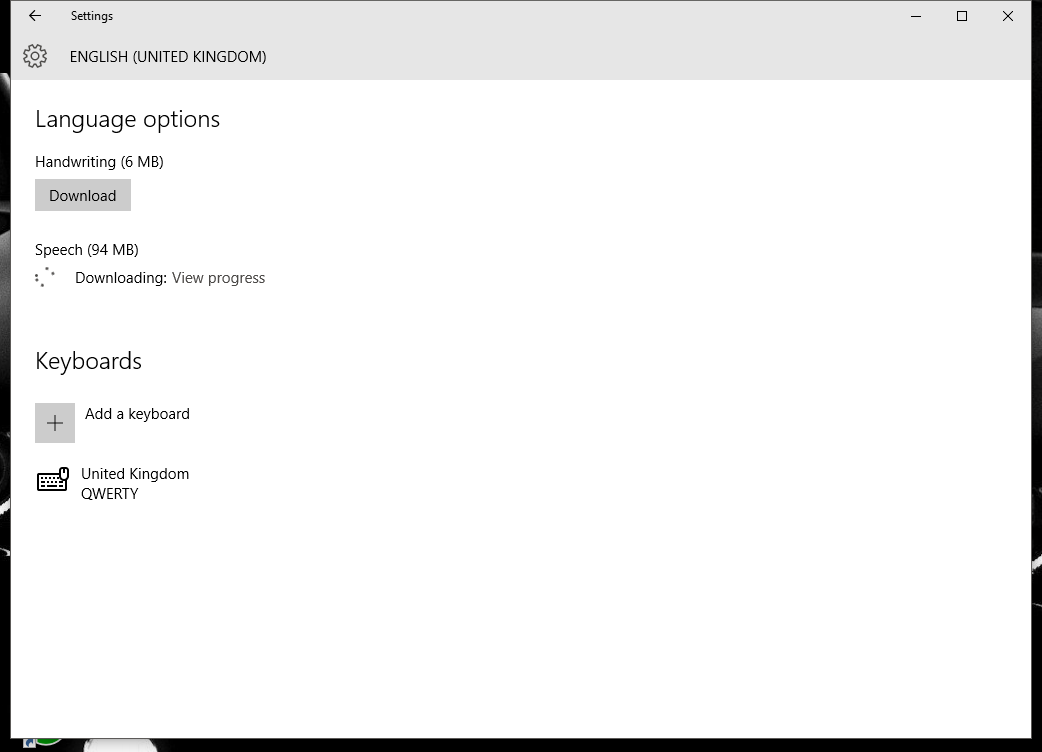
and click on Download under speech


Once the download has finished, click on Settings


These should all be set to UK, if they're not, select UK from the drop down lists and then click Apply settings to the Welcome Screen etc


Now, head back to Settings, Time and Language and then Speech and select English UK from the drop down.


For some reason with me, this option didn't appear straight away. I clicked around back and forth a couple of times and then it appeared as an option. Ideally, I guess a reboot would have prompted the appearance.

Its a lot of clicking around back and forth but it's the way its done! I've used it a couple of times and it is remarkably clever.


Friday, 21 August 2015

Windows XP Update through Explorer not working after fresh install

Regarding my last post, I've just done a fresh XP install on a Dell Dimension 2400. The OEM version of XP on this was up to Service Pack 2. After installing SP3 I then installed .Net Framework 4 and still had the problem of not being able to initiate updates. If you have this problem as well, try this fix from Microsoft. It worked for me! Its fix number 50777.

Thursday, 20 August 2015

Picasa constantly searching photos as though it was a fresh install..

This happened to me before in an installation with Windows 7 and has happened again with Windows 10. There's surprisingly little info out there on how to fix it despite it being a problem that a lot of people suffer with.

The symptom; every time I opened Picasa it would ask me where I wanted it to search for pictures, as though it was just installed. It would run the search find everything. Then when I closed Picasa and returned to it moments later, it would ask to do it all again. Clearly.. summit broked.

The only way I could fix this was to uninstall Picasa, then manually remove the leftovers. I found associated Picasa data here;

C:\Users\######\AppData\Local
C:\Program Files (x86)

(##### is your username)

Just delete the folders with Picasa mentioned in their names.

I then restarted my PC (I'm old fashioned and always found restarting solved many problems - and clears the cache)

After deleting this and then downloading a fresh copy of Picasa (as I had done before - god knows why this worked) the installation worked and Picasa behaved as it's supposed to.

This isn't the disaster it sounds, if you login to your Google account with Picasa it automatically identifies the items you've previously uploaded etc. It sounds like major surgery but it isn't and it worked for me!

Installing Quicktime in Windows 10

Okay, so far I love Windows 10. I did a straight upgrade on my laptop (the HP G6 I've mentioned before) however on my PC, I decided that I wanted to increase the size of the SSD I had installed and then put a fresh Windows 10 installation on that. Although there is a way to download Windows 10 as a standalone, I found that it wanted a COA key. It didn't recognise the Windows 7 COA like I figured it would. The way I got around this, was to upgrade Windows 7 to Windows 10 and then create a recovery USB and then install that onto the new SSD. It worked!

So, the laptop was working fine, all the old stuff carried on as usual however I was buggered on the PC as I like to use Picasa and was unable to view videos etc without Quicktime installed. Apple has not yet made Quicktime compatible with Windows 10.

The work around.. download Quicktime. Unzip the download (right click etc - I use a really good program called 7zip for this). Once unzipped run AppleApplicationSupport and then AppleSoftwareUpdate. These should install fine. Then, right click on Quicktime and select Troubleshoot Compatibility. Windows 10 then literally figures out the rest and installs Quicktime as it should.

Tada!

Getting the updates to work after a fresh install of XP

I've recently decided to clear out a load of my old IT stuff that I don't use very much. I found two Compaq D510's, one is a Pentium 4 2.4 and the other a Pentium 4 1.6. They both had over 1GB of RAM in them which isn't bad!

I decided to stick a fresh install of Windows XP on them so that I could sell them both on Gumtree. I figured someone else might make better use of them.

If you have an old Windows XP terminal with a COA sticker and no installation disk, you'll need to track down a copy of Windows XP OEM. This will basically accept any COA sticker and run with Windows activation program after installation. So far, I've never had any issues with this.

One of the first problems I came across after installing XP was getting all the updates. Even with SP3 installed there was still a problem, basically, the Windows Update page wouldn't load at all. The fix for this is to install Microsoft .NET Framework 4. This filled in the gaps between an old copy of XP and the updated updates feed!

Thursday, 24 April 2014

Fixing a not even broken windscreen washer pump and perished hose on a Jeep Cherokee '94 XJ

I've had a knackered washer pump (or so I thought) for a while now on my Jeep, so finally got round to fixing it. The washer pump and reservoir is located underneath (or above) the nearside wheel arch. It's all plastic and plastic clips in there so be warned, they pretty much all brake and needed replacing.


As you can see from the above photo, its quite a snug fit in there. A while back the Jeep had been in a garage and they decided that the best way of fixing what they thought was a knackered washer pump was to use a Ford Transit pump.. hence the proper connector was cut off on the car side of the wiring.

Pulled the old Transit pump off and replaced it with a new pump I'd bought from ebay. I had to use spade connectors and solder some wire to the terminals on the pump as the original connector had been removed by the garage.. Pump wired in and tested.. pump runs but little or no water came out of the jets. A small trickle did however appear from the nearside wheel arch (I'd seen this before but figured it was a result of wedging a Transit pump in there).

Next job was to remove the grill around the windscreen wiper arms, this is a really simple job, approx 8 philips head screws. To remove the windscreen wiper arms, there is a clip positioned near the rotation point;


in order to release the clip you need to raise the arm (as you would if you were replacing the wiper blades) and ease the clip across with a flat head screwdriver. The clip does not fully release as you can see in the picture on the left. Once the clip is loosened, you can pull the wiper arm off (pictured below left)


After the wiper arms are off, you can completely remove the grill below the windscreen. In here you can see the hoses that run from the pump and on to each jet via a splitter. On the right you can see the hose that's perished. It appears that over time the wiper mechanism has eroded the hose until it failed. So, the original pump was absolutely fine.

I replaced the hose with some fuel hose I had left over from a previous job I'd done one my camper and used a couple of small cable ties to make sure they were on nice and tight.

Refitting is the reverse of removal. One thing to remember, if you're testing your washer jets make sure you let the motor finish its cycle before switching the power off to avoid the error I made. I turned the ignition off before it finished its cycle, replaced the wiper arms, turned the ignition back on and nearly sent both wipers through the grill!

So, both windscreen washers work again. Somewhere out there is the original perfectly good pump for my Jeep...

Below is a video showing the movement of the windscreen wiper mechanism, you can see how over time a small amount of rubbing could cause a hose to fail.


Sunday, 30 March 2014

Dynamic DNS NOIP.com and linking it altogether with NAS4FREE

I've been playing around with my NAS4FREE server for a while now and wanted to work out how to create my own memorable URL rather than having to A) use my IP B) know what my IP was when I'm away from home.

My IP rarely changes as I'm with Virgin however I still didn't want to be away from home and not be able to access my server if my IP should change. I used the noip.com service to setup my own free domain name. 


Select Hosts/Redirects and create a name. It'll ask you to enter your current IP address so that the host name and your IP can be linked. From now on, instead of typing in your IP, you'll be able to use this host name instead.

There are tools available to download from their site that you can install on your PC/Laptop that will automatically login to NOIP and update your IP however I wanted a way of getting my server to do this for me.

Fortunately, within NAS4FREE there is a tab for just such a service! Just click on Services, then go to Dynamic DNS.


From there you can select your Dynamic DNS provider from a drop down list, and then enter your username details and how often you want your server to update your IP.
Genius!

Monday, 17 March 2014

Making use of a D-Link DIR 615 Router (issued by Virgin Media)


If like me you're a long standing Virgin Media customer, you probably have a D-Link 615 router laying about. They gave off a decent enough signal but were pretty useless if you wanted to do anything remotely interesting with them, by interesting of course I mean port forwarding etc! Thanks to DD-WRT and their software, you can flash the memory of your old router and make something far more handy of it. The above link takes you to the firmware search page, check the base of your router to ensure the variant of your 615 before downloading.

I have a cabin at the bottom of my garden and wanted to be able to boost the signal out to it and be able to ponce about with my old PC's without having to involve a USB wireless device. Following the above video I was able to set it up very easily. The guy who made this video uses the site survey option which isn't mentioned on the wiki page for the software. I'm also planning to install this setup in my parents house so they can get wireless everywhere! - check my comment for the only discrepancy I had between what he said and what was happening, however that could easily have been a cache/browser issue my end. His description showed me where I was going wrong, basically I kept getting stuck on the wrong subnet. DDWRT starts the router off on 192.168.1.# and every time I changed it to 192.168.0.# I would lose it because my laptop was still floating around on 192.168.1.# all by itself!


DD WRT gives a staggering amount of extra functions to your old router. If I explore any of the other things it can do, I'll post my findings on here!

Sunday, 16 March 2014

HP G6 running like it should


Further to my last post about the SM Bus Controller issue, I've just completed a full re install of Windows 7. After updating the BIOS (previous post) I was able to boot direct from the DVD drive which meant I could properly format the disk and start again. I then re installed the drivers I wanted from the HP website apart from The display/graphics adapter drivers. I then installed the SM Bus Controller I'd taken from the Lenovo website. The Catalyst program comes with it which enables you to control the resolution etc. You do not need to install any other graphics/display drivers.

This laptop is finally running like it should have when it came out of the factory. God knows why developers spend fortunes developing hardware only to slow it down with a load of bloatware. 

HP Pavilion G6-1336SA Can't boot from CD/DVD USB etc


In a nutshell you need to flash your BIOS. Its not painful. Just visit the HP website and let the auto detect device figure out what model your laptop is and within the list of downloads should be a BIOS upgrade. I remember doing this used to be quite an upsetting process however it was utterly simple! Click click click and now when you press "Esc" at boot up, it shows the boot menu you're used to with other computers, rather than just the Windows repair options.

HP Pavilion G6-1336SA SM Bus Controller


I have a HP G6, looks great and feels like its well made, however the amount of bloatware on it was crazy, making it depressingly slow. I decided to format the whole thing and do a fresh install of Windows 7 minus all the guff that HP included.

The HP website quite helpfully has a auto detect function that lets you know what drivers you need, however after everything was installed (minus a few things I didn't feel I needed) I kept getting the SMBus Controller showing as not being installed in the Device Manager list. Did lots of searching, manually scrolling around the AMD website for drivers, forums etc etc and couldn't actually find a solution. So, I hunted about myself and found that Lenovo use the same chipset in one of their devices. Click this link to visit their page and hey presto! SMBus Controller problem gone!

Wednesday, 19 February 2014

Samsung Galaxy Note 2 sim card errors

For the last couple of months I kept getting an error message telling me that I had no sim card and that I needed to restart my device..  Very very annoying.

On inspecting the sim card I noticed that it had bowed slightly. I can only imagine the heat of the phone being on constantly must cause plastic to bend? Anyway I needed to find something that would wedge between the sim and the phones case.

I found a pack of little rubber stops that fit on kitchen doors,  shaved a little bit off the top with a stanley knife and stuck the sticky bit to the sim. Job done!  It works. Legend.

Sunday, 9 February 2014

Getting sound to work on a HP Media Center m7240.uk with Windows 7

Oh my golly its been a while since I last wrote anything on this.. its not to say I haven't been busy fixing/bodging stuff its just I haven't had chance to write about it!

Well, this is a little update, only a small job but one that had been royally p*ssing me off. I recently installed Windows 7 on my HP Media Centre. It'd been happily running XP however, after getting a laptop a laptop with 7 on it, I realised how good this operating system was. Anyhoo, install it.. and everythings good.. except for the sound!!

I tried a number of different things, downloading the XP audio driver from HP and installing it using compatibility mode (right click on the .exe file, click properties then head to the compatibility tab), no dice, then went to Realtek for the most recent driver from them, installed it.. no dice!

So after a little bit of head scratching/crying, I decided to check out the system settings (bios) and have a look at the onboard audio settings (before this I uninstalled the audio devices through device manager) I knew they were set to AUTO but figured I'd have a little play with that.. changed it to ENABLED logged into Windows 7 then watched as the audio devices reinstalled themselves.. hey presto.. sound!

I've noticed quite a few PC's upgrading (fresh install of 7) have not had the audio drivers install like graphics etc. My Dell GX280 had no sound until I'd messed around with it for a while and neither did my Toshiba TC1100 which required me to download the most recent but one XP audio driver and install that?!?

I don't know why its being so awkward but it was.. and yet its all working now like nothing ever happened.

Next on my to do list.. cut down a tree, rebuild rear suspension on BMW 5 Series, get my T25 aircooled started.. change wheel bearings on my Jeep Cherokee XJ.. put in a new kitchen, sort out leak in flat roof....

I intend up update this blog with all of those adventures..

Oh and landscape front and back gardens..

Tuesday, 11 October 2011

Google Plus.. D minus.

I'd been hearing about Google Plus for a while and was quite excited about trying it out. I've loved pretty much all of Googles products so far, some times they can be a little fiddly and not the easiest to manoeuvre or know exactly what it going on.. Google Images/Photos for example.. they've only just tweaked it to tell people you've already shared an album with that you've uploaded new pictures. Anyone who had favourited your work wouldn't know you'd added anything new until you literally grabbed their head and pointed it at the screen. That seems to have been resolved now and its a jolly good thing too.

Anyhoo, I finally got an email from someone inviting me to join Google Plus. I signed up.. basically its a social networking site, on that basis it will suffer if few of your friends use it.. few of my friends use it, which wasn't a major problem as I'm not a big social networking (facebook/twitter) user. What did irritate me however was the level to which it stuck its nose into literally everything I did.

I do pretty much everything through Google and in a weird way its become quite an important part of my life. If you think about it.. you're sharing your messages, thoughts, pictures, video's even current location.... literally all those things that used to be tucked away in albums or diaries or known only to close friends and family (or neither) with this massive brightly coloured company that's primary business is essentially sharing information/telling tales. There is an (large) element of trust there between you and them.. you and Google. Like it or not, that's the situation. So, when it comes to them fooling around with your information, its quite easy to start spooking people.

Whereas Facebook sits separately from your emails and photo's only working with what you decide (to a degree, they've received a lot of criticism for the amount of data they're capturing without your knowledge i.e "would you like to sync your contacts with Facebook... great I'll take EVERYTHING and their phone numbers too") to share with it, i.e specifically picking out an image and uploading it, Google Plus will merge all your pictures and then let you decide what you're sharing from there. Instead of you being able to continue to work with your existing Google products as before, it'll weasel its way into everything and then let you chose whom you share with rather than whether you share at all.

I upload a lot of my photography to Google Images using Picasa (both great ideas) and went to look at them today. Instead of being greeted by the nice simple layout of old Google Images I was met with Google Plus and a bunch of someone else's pictures.. I didn't really want to see that other persons pictures, I wanted to see mine. Imagine walking into a room in your house, expecting to see it decorated the way you'd left it, only to find it altered to someone else's taste and with someone else's work. Agreed Google has always made updates and alterations to its products before and they've generally worked very well however its always been based around your content and not someone else's.

I feel that they might be underestimating how personal a lot of their products are to people and how easily people could become upset by the way their things are being played with. By all means create Google Plus and by all means give me the option to share my photo's or messages or calendars with others but have Google Plus as an extra not a "be-all" as it was quickly becoming, down to every picture I took with my Android phone immediately being sent to Google Plus to be shared... I mean seriously, not everyone is an exhibitionist and some things aren't meant to be shared, just enjoyed by the creator.